
Hello Friends,
Hope you all are doing good and enjoying FIFA World Cup 2026 🙂
Let me start with a scenario that most of you might have already lived through, or will immediately recognize.
The cluster fails over. The resource moves from Site A to Site B, as expected. You open Failover cluster manager and everything is green. You take a breath and declare it successful.
But then tickets start flowing in 😦
Users are unable to connect. Application team starts reporting connection errors. You check the cluster again and it still looks perfectly healthy.
But users are still on hold. So what went wrong?
The cluster showing green only means that the resource moved successfully and the clustered resource is online from the cluster’s point of view. Whether users can reconnect, and how quickly they can reconnect, depends on a handful of other things such as DNS behaviour, client configuration, and application settings as SQL driver settings.
That is what this post is about.
Microsoft already provides good step-by-step documentation for creating a failover cluster, so I am not going to repeat the wizard steps here. Instead, we will focus on the practical details that usually create confusion during multisubnet cluster configuration and troubleshooting.
Why Multisubnet clustering behaves differently
In a normal single-subnet cluster, the clustered role generally has one IP address. During failover, the role moves from one node to another. Since the IP address still belongs to the same network, client connectivity is usually simpler.
In a multisubnet cluster, nodes are placed in different subnets. This is commonly done across datacenters, sites, or availability zones. Here, the clustered role cannot use the same IP address in both subnets. Each subnet needs its own IP address.
Below is an example of a two subnet cluster with two nodes in each subnet. As shown in the diagram, each subnet has its own cluster IP.
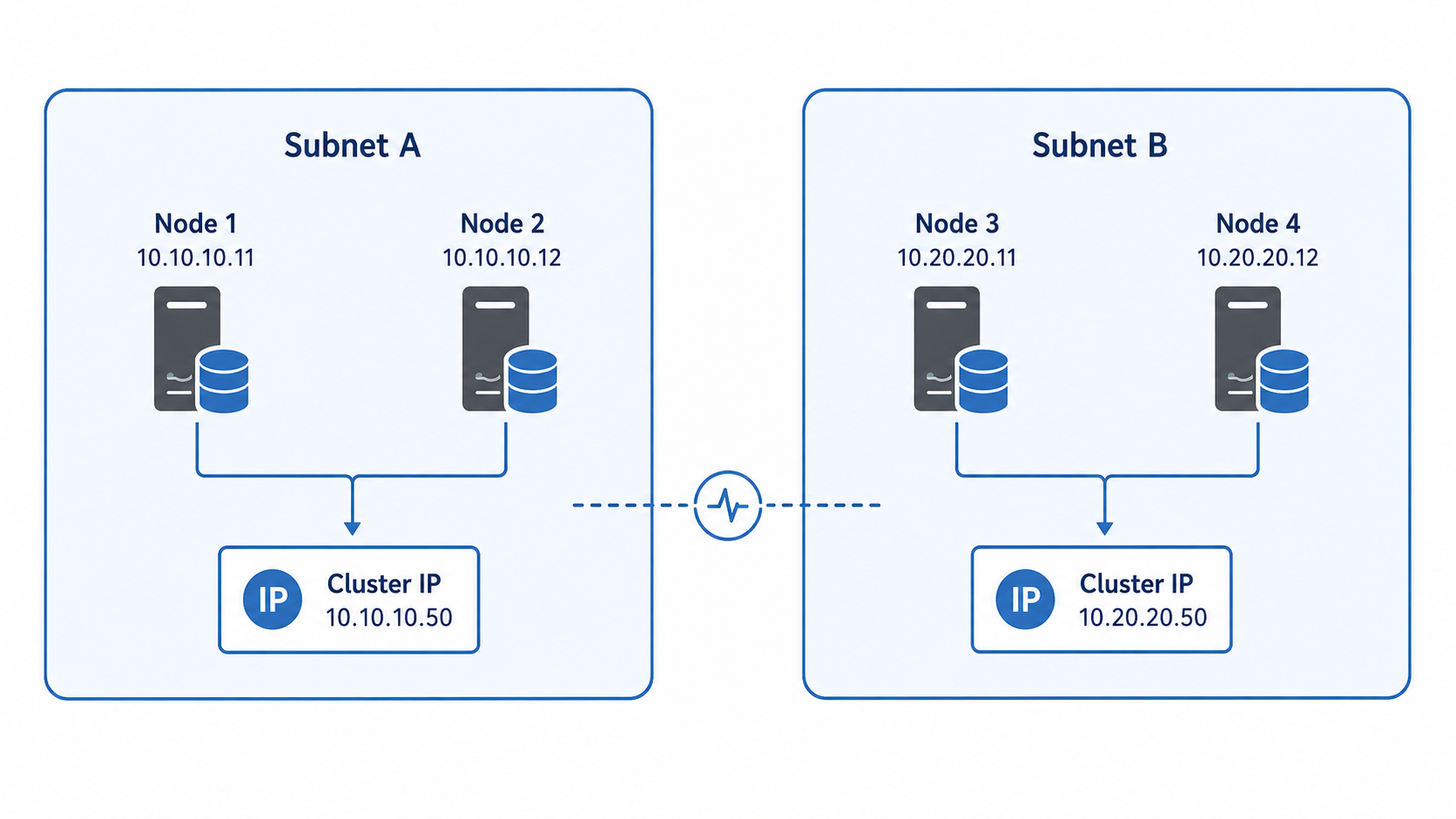
When the role is active in Subnet A, the IP address from Subnet A is online and the IP address from Subnet B remains offline. If the role fails over to Subnet B, the Subnet B IP comes online and the Subnet A IP goes offline.
This is expected behaviour.
That is the first thing to understand clearly. In a multisubnet cluster, one of the IPs being offline is not always an issue. It may simply mean that the role is currently active in the other subnet.
How CNO should be configured in multisubnet cluster
When Failover cluster is configured, a computer object is created in Active Directory for the cluster name. This is called Cluster Name Object, or CNO.
For example, if cluster name is CLUS01, then CLUS01 is the CNO in Active Directory.
In a multisubnet design, this cluster name should have IP resources from both subnets. The dependency is generally configured in such a way that the cluster network name can come online if either subnet IP is online. This is commonly understood as OR dependency.
So, in our example, CLUS01 depends on 10.10.10.50 OR 10.20.20.50
This does not mean both IPs must be online at the same time. It simply means the cluster name should come online with the IP that belongs to the subnet currently owning the resource.
Another important configuration is DNS setting.
In a multisubnet configuration, the cluster name is associated with IP addresses from both subnets. How those IPs appear during DNS lookup depends on the RegisterAllProvidersIP setting.
RegisterAllProvidersIP Explained
RegisterAllProvidersIP is one of the most important settings in multisubnet cluster configuration. This setting controls whether DNS should register only the active IP address or all IP addresses linked with the cluster network name.
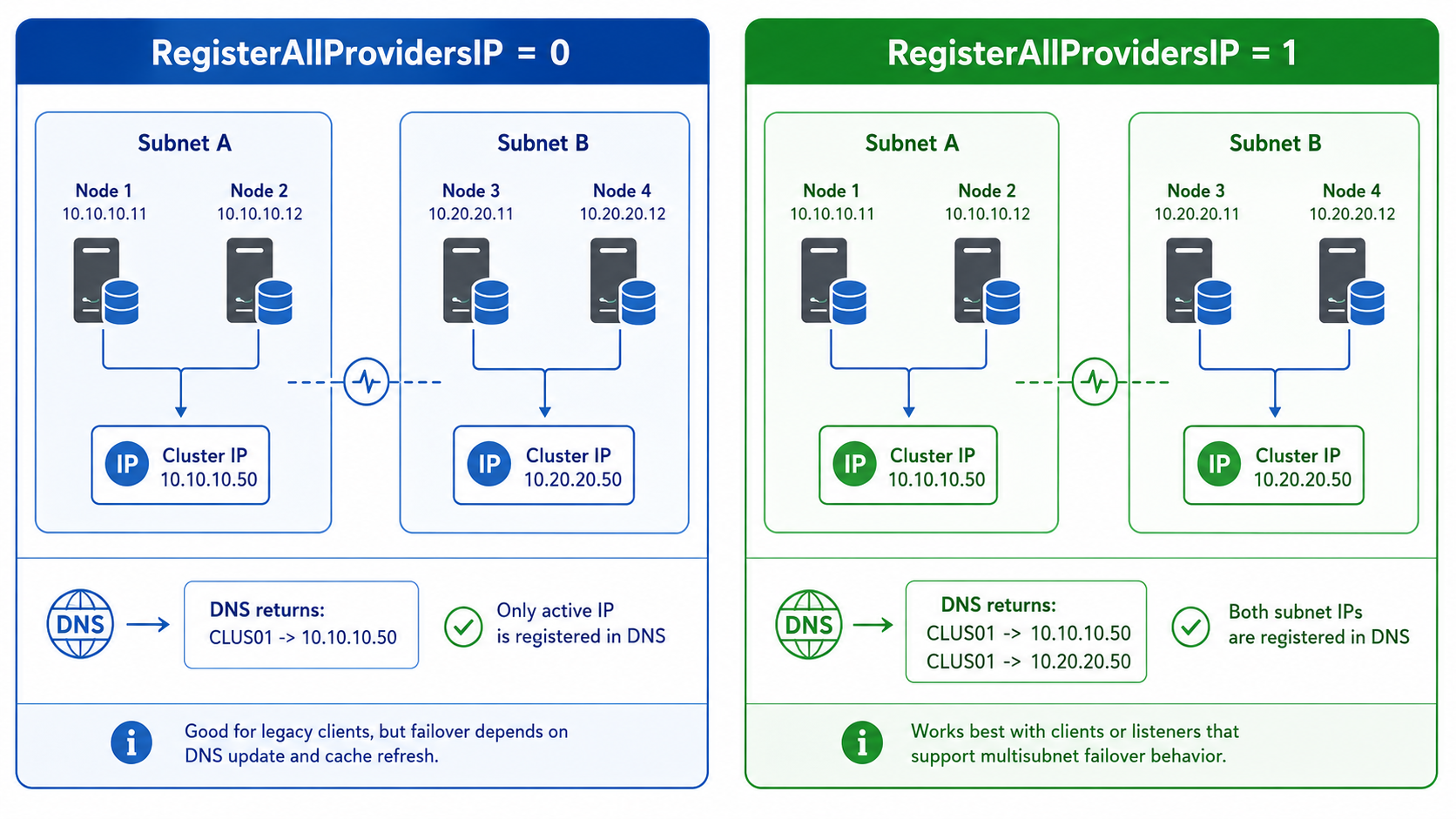
When RegisterAllProvidersIP is set to 0, only the currently active IP address is registered in DNS. After failover to another subnet, DNS needs to update to the new active IP. Clients may continue using the old IP until DNS cache expires.
When RegisterAllProvidersIP is set to 1, all IP addresses linked with the network name are registered in DNS. In this case, DNS returns both IP addresses. One IP may be online and another may be offline at that time.
So, RegisterAllProvidersIP = 1 does not make both IPs active. It only registers all IPs in DNS.
Client behaviour then decides how quickly the connection succeeds.
Should RegisterAllProvidersIP be 0 or 1?
There is no one answer for every environment.
If the client application understands multisubnet connectivity, RegisterAllProvidersIP = 1 is usually better because DNS already has both IPs. After failover, the client can connect to the IP that is currently responding without waiting for DNS record update.
But if the client application does not understand multisubnet behaviour, it may try the returned IPs one by one. If it tries the offline IP first, users may see connection delay or timeout.
On the other side, RegisterAllProvidersIP = 0 gives only the active IP to the client. This is easier for legacy clients, but failover depends on DNS update and DNS cache expiry.
So the practical way to think about it is this:
- If the application does not support it, RegisterAllProvidersIP = 0 may be safer, and HostRecordTTL can be tuned if required.
- If the application supports multisubnet-aware connectivity, RegisterAllProvidersIP = 1 is usually the right choice.
A quick note on HostRecordTTL
HostRecordTTL becomes relevant mainly when RegisterAllProvidersIP = 0.
If only the active IP is registered in DNS, then after failover clients need to pick up the new DNS record. If the DNS record is cached for too long, they may continue trying the old IP even though the cluster has already failed over successfully.
Reducing HostRecordTTL can help shorten that delay, but it is still a trade-off. Lower TTL means clients refresh DNS sooner, but it can also increase DNS query volume.
So, it is useful to know where it fits, but it should not be changed casually without understanding the impact.
“MultiSubnetFailover” is not a cluster setting
Now let us discuss another important setting, MultiSubnetFailover.
It is not a Windows Failover Cluster setting. It is a client connection string property used by supported SQL client drivers.
This setting tells the SQL client that the listener may have multiple IP addresses across multiple subnets. When MultiSubnetFailover=True is used, the client driver can try connecting to multiple IP addresses more efficiently, instead of waiting for one IP to fail before trying the next one.
This is why MultiSubnetFailover works well with RegisterAllProvidersIP = 1.
DNS returns both listener IPs and the client tries them simultaneously. The IP that is currently online responds, and the connection is established faster.
Without MultiSubnetFailover, the client may try IPs sequentially. If it tries the offline IP first, connection can be slow.
What this means in SQL listener configuration
In SQL Always On or any SQL multisubnet listener setup, the listener should have one IP from each subnet.
For example:
SQLLISTENER01 → 10.10.10.60
SQLLISTENER01 → 10.20.20.60
If RegisterAllProvidersIP = 1, both of these listener IPs can be registered in DNS.
Now if the application is using a supported SQL driver and the connection string includes MultiSubnetFailover = True, failover experience is usually much better because the client can connect to whichever listener IP is active.
That is why, in SQL environments, the usual recommendation is:
- Listener configured with one IP per subnet
- RegisterAllProvidersIP = 1
- SQL connection string using MultiSubnetFailover = True
If the application or driver does not support MultiSubnetFailover, then the design decision becomes different. In such cases, teams keep RegisterAllProvidersIP = 0 and tune HostRecordTTL accordingly.
So, the right answer is not only “what the cluster supports.” The right answer is “what the application as SQL client driver support.”
Hence, a multisubnet failover cluster is not difficult only because of the cluster creation wizard. The real understanding is around IP and DNS behaviour.
So next time when you have a failover in a multisubnet cluster configuration, don’t just check the green checkboxes in cluster console. Also check other configurations as:
- Which IPs are configured?
- Which IP is online?
- What IPs are returned by DNS?
- What is RegisterAllProvidersIP set to?
- Is the SQL connection string using MultiSubnetFailover=True?
- HostRecordTTL settings
Understanding these settings not only help in troubleshooting. It also helps you design the cluster correctly from the beginning so that users never notice the failover happened at all.
That is the real goal, isn’t 🙂
So that was all in this post. I hope this was useful. I will love to hear your comments and will see you soon with some other technical stuff. Till then, ta-ta.

 AN IT DIARY of AI, Windows, MEM & PowerShell